
What are Header Tags (H1, H2, H3) and Why Are They So Important?
If you’re a blogger, it’s crucial for you to know what Header Tags SEO is and why it’s so important. Without proper use of header tags SEO, you will never be able to rank your blog on Google.
If you properly use header tags SEO in your blog or website, not only will your article look attractive, but it will also be easier for users to understand what your article is about.
If you’re not familiar with this and want to know all the information related to it, make sure to read this post completely.
What is Header Tags?
Understanding Header Tags is very important for every blogger. Header Tags are also known as HTML Tags. In short, Header Tags are also referred to as the (<H1>) Tag. The structure of any blog post is prepared using Header Tags, which are divided into H1, H2, H3, H4, etc. Understanding what Header Tags are is not that difficult. Header Tags are a code snippet written on the HTML Element.
Their main function is to instruct the web browser on how to display the content text on the webpage. When you write a post or an article, you need to use header tags, and at that time, you have to write all the tags from H1 to H6 in a sequential manner. Here, I should mention that the H1 tag is the largest and most important tag, and the H6 tag is the smallest among them and holds the least importance.
How many header tags are there?
There are six header tags, ranging from H1 to H6. The H1 tag is used for the main heading, which is considered the most important, and the significance decreases down to the H6 tag, which is the least important.
Here’s the information organized into a table format for clearer understanding:
| Header Tag | Usage | SEO Tips |
|---|---|---|
| H1 | Main title of the page/post. | Include your primary keyword. Ensure there’s only one H1 tag per page. |
| H2 | Main section headings within your content. | Incorporate related keywords. Helps in structuring content for search engines. |
| H3 | Subsections under H2 headings. | Great for targeting long-tail keywords and variations of your primary and secondary keywords. |
| H4 | Further dividing sections under H3 tags. | Contributes to user experience by making content easier to navigate. |
| H5 | Subdivisions of H4 sections, offering even more detail. | Primarily used for organization and readability; less impact on SEO. |
| H6 | The least important and detailed header, under H5. | Used for deep organization; minimal SEO impact but aids in readability. |
General Tips:
- Maintain Hierarchical Structure: Use header tags in order to ensure a clear structure.
- Avoid Skipping Levels: Maintain the sequence without jumping levels to avoid confusion.
- Focus on User Experience: Optimize headers for both SEO and readability to engage readers effectively.
Benefits of Using Header Tags
There are numerous benefits to using header tags, which are quite significant for any post or page, such as:
- Using header tags makes your article look much more attractive and professional, which in turn increases visitors to your blog.
- With the help of header tags, users coming to your blog can easily understand what topic you have written about.
- Moreover, when you break down your blog topic with the help of heading tags, it benefits you in two ways: first, your post becomes clearer to users, and second, breaking down the size prevents your users from getting bored.
- When search keywords are used in header tags, it makes the topic much clearer to search engine bots, which can improve the search ranking of the website.
How to Do Header Tags SEO?
To optimize your content with header tags for SEO, follow these guidelines:
- Use Sequential Order: Start with an H1 tag for your main title, followed by H2 for main headings, and H3-H6 for subheadings in a hierarchical structure. This helps search engines understand the structure of your content.
- Include Keywords: Incorporate your primary keyword in the H1 tag and use related keywords in H2 and H3 tags to improve your content’s relevance and SEO.
- One H1 Tag Per Page: Ensure there’s only one H1 tag per page, typically used for the title of your content. This clarifies the main topic of the page to search engines.
- Keep it Clear and Concise: Make your headings clear and to the point. This not only helps SEO but also improves user experience by making the content easier to scan.
- Reflect the Content: Each header should accurately reflect the content that follows. This aids in user navigation and helps search engines index your content accurately.
- Utilize H2 and H3 for Important Points: Use H2 and H3 tags to highlight important sections and information within your content. This emphasizes these points to search engines.
By following these strategies, you can effectively use header tags to enhance your website’s SEO, making your content more accessible and understandable to both search engines and readers.
How to create a header structure in an article?
A structure is established for using header tags in any article, which helps users understand the article properly and easily. This way, it is displayed in a sequence so that the content can be properly organized, such as:
| <H1>Universe </H1> |
| <H2>Earth<H2> |
| <H3> Asia<H3> |
| <H4>India <H4> |
| <H5> Delhi<H5> |
| <H6>QutubMinar<H6> |
H1 Tag
For your information, let it be known that the H1 tag is the most important in your Page or Post. Therefore, when you write an H1 tag, you must pay attention to a few things, which are as follows:
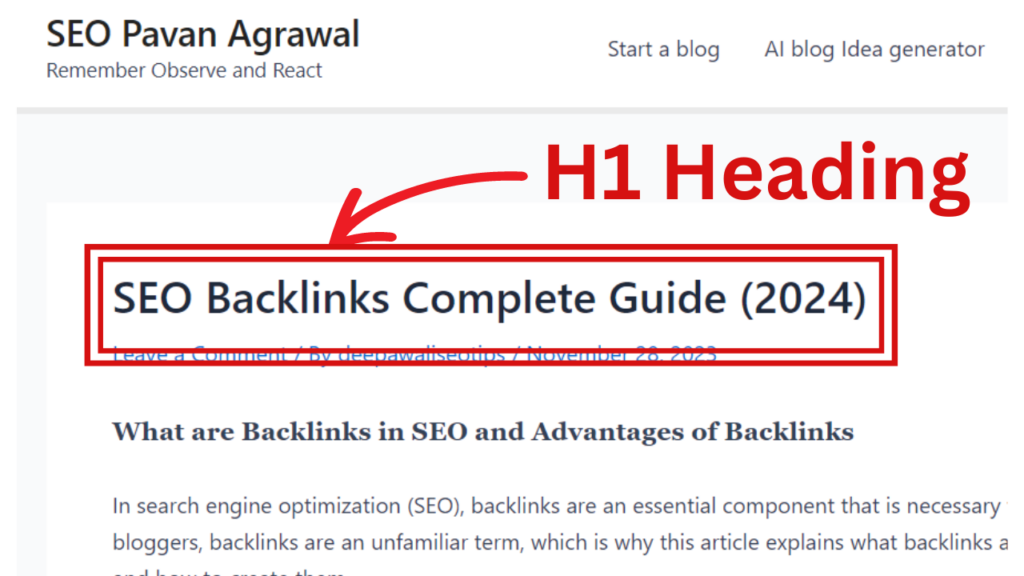
- In the H1 tag, the title of the post or page, meaning the name of the article, is written.
- If your blog is on WordPress, it should be noted that the H1 tag is already set by default in the title box, so it would be better for you to ensure this first before using it.
- Use the H1 tag only once in your article.
- When writing the H1 tag in the article, ensure that it contains keywords within the range of 20-70 characters.
- Most of the keywords (about 80%) that appear on the first page of search engines are in the H1 tag, so write it with great care.
H2 and H3 tags
Here, let it be known that the H2 and H3 tags are used to explain all the detailed information of the article’s main title. Therefore, when you use H2 and H3 tags, keep the following points in mind:
- H2 and H3 tags are used to display all the subheadings of the title, so in them, you should write the subheadings of your title.
- Any search keywords for the blog or article are included in the H2 tag.
- Additionally, you can represent H2 as a subheading of H1 and H3 as a subheading of H2.
H4,H5 और H6
Although H4, H5, and H6 tags are generally used less frequently, they are used to display subheadings of subheadings. Additionally, these tags are more commonly used in articles that are long and descriptive, and they can also be used for sidebar text and bullet points.
Why is Header Tags Important?
After understanding what Header Tags are, it’s very important to understand their importance. Friends, many times you might have read various books. But have you ever read a book that doesn’t follow any sequence? If you have, how was the experience? Maybe it wasn’t as clear to you.
Similarly, if your post also lacks a sequence, both your users and Google’s crawlers will not understand your post, which is why Header Tags are very important.
Whatever your topic is, it is divided from H1 to H6, creating a structure for your post or page. Such a structure is considered an ideal structure for your post. From an SEO perspective, Header Tags are also very important.
Using Header Tags in Blogger
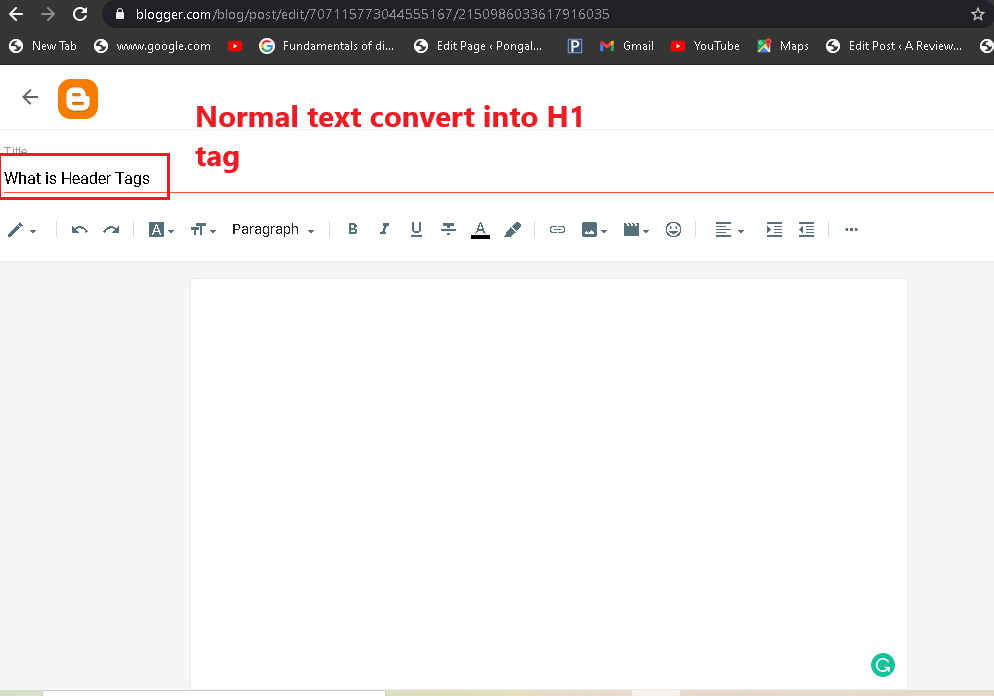
When you write a post in Blogger, you find 4 formats in the title box, which are as follows:
- Heading
- Subheading
- Minor Heading
- Normal
Let me now tell you how you can add or use your blog in Blogger.
In 2021, there have been quite a few changes in Blogger. Now, you don’t have to use the old method for writing posts in Blogger. You can directly write your H1 tag in the title and then complete the rest of the post with H2, H3, H4, etc.
Using Header Tags in WordPress
Creating header tags in WordPress is straightforward, thanks to its user-friendly editor. Here’s how you can do it:
Write Your Article:
- Start by writing or pasting your article into the WordPress editor.
Adding New Post:
- Navigate to your WordPress dashboard.
- Click on “Posts” > “Add New” to create a new post.
Using the Block Editor:
- WordPress uses a block editor (also known as Gutenberg) by default.
- For each paragraph or section, you’ll create a new block.
Adding Header Tags:
- To add a header, click on the “+” icon to add a new block and select the “Heading” block.
- Choose the appropriate heading level from the block settings (H1, H2, H3, etc.). The H1 tag is typically used for your main title, so for sections and subsections within your content, you should start with H2 and go down from there.
Formatting Your Headers:
- After selecting a “Heading” block, write your heading text.
- In the block toolbar or the block settings on the right, you can select whether it’s an H1, H2, H3, etc.
Repeat for Subsequent Headers:
- For additional headers within your content, simply repeat the process, selecting the appropriate heading level for each section.
Preview and Publish:
- Once you’ve added all your content and headers, preview your post to ensure everything looks good.
- Make any necessary adjustments, then hit “Publish” when you’re ready to make your post live.
Note: It’s best practice to use only one H1 tag per page (usually for your title), and then use H2s for main section headers and H3s for sub-sections, and so on. This helps in structuring your content clearly for both users and search engines.
How To create header tags in HTML
To create header tags in HTML, you follow a simple syntax that defines the headers from H1 to H6, which represent different levels of headings on a webpage. Here’s how you can create them:
<!-- H1 tag for the main heading -->
<h1>This is the Main Heading</h1>

<!-- H2 tag for the secondary heading -->
<h2>This is a Secondary Heading</h2>

<!-- H3 tag for the tertiary heading -->
<h3>This is a Tertiary Heading</h3>

<!-- Further subheadings -->
<h4>This is a Fourth Level Heading</h4>
<h5>This is a Fifth Level Heading</h5>
<h6>This is a Sixth Level Heading</h6>- H1 tag is typically used for the title of the page and should be used once per page for the best SEO practice.
- H2 to H6 tags are used for subheadings, with H2 being the highest level of subheading and H6 the lowest. These can be used multiple times depending on the structure and depth of your content.
Remember, the use of header tags helps structure your content clearly, making it more accessible to both users and search engines.


0 Comments